
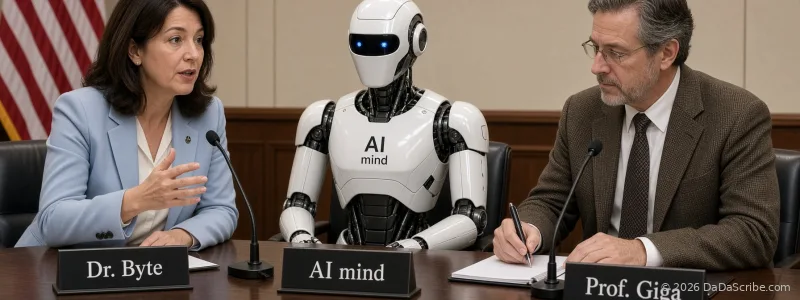
You just finished a two-hour deposition. Three speakers. Overlapping dialogue. The recording quality is what it is: courtroom mics, ambient noise, someone shuffling papers two feet from the recorder.
You need a transcript. Not just any transcript. You need to know who said what, correctly attributed, without spending the rest of the week fixing speaker labels by hand.
This is the reality of legal and medical transcription. It has nothing to do with podcast show notes or YouTube captions. And yet, nearly every "best transcription tools" roundup published in 2026 is written for content creators who care about turnaround time and subtitle exports, not speaker attribution, not multilingual accuracy, and certainly not the kind of domain-specific terminology that shows up in depositions, clinical notes, and compliance interviews.
This article compares five transcription tools (DaDaScribe, Rev, Sonix, Otter.ai, and TurboScribe) on the criteria that actually matter for legal and medical professionals: speaker diarization, language coverage, accuracy on domain terminology, and value per dollar. No fluff, no affiliate-link rankings.
Why Legal and Medical Transcription Is a Different Game
Three things separate professional transcription from the content-creator use case.
Speaker attribution is not negotiable. Diarization (separating and labeling who spoke when) is the difference between a usable transcript and a block of text you have to reconstruct from memory. In a deposition, "the witness stated" and "opposing counsel objected" are opposite sides of the same exchange. Merge them into one speaker stream and you lose the entire structure of the testimony. The same applies to doctor-patient consultations, compliance audits, and any multi-party interview where attribution carries legal or clinical weight.
Terminology accuracy has consequences. General-purpose transcription engines are trained on conversational English. They handle "going to the store" just fine. They stumble on "idiopathic thrombocytopenic purpura" and "res ipsa loquitur." A tool optimized for podcasts will mangle medical terms and legal Latin at a rate that makes the output unusable for anything beyond a rough draft.
Multilingual needs are real and growing. Law firms with international clients. Hospitals serving multilingual patient populations. Compliance teams auditing cross-border operations. If your transcription tool handles English and maybe Spanish, you're leaving a large chunk of your caseload untranscribed.
These three criteria (diarization quality, domain accuracy, and language coverage) are the lens we'll use for every tool in this comparison.
Most of This Audio Is Dictation, Not Meetings
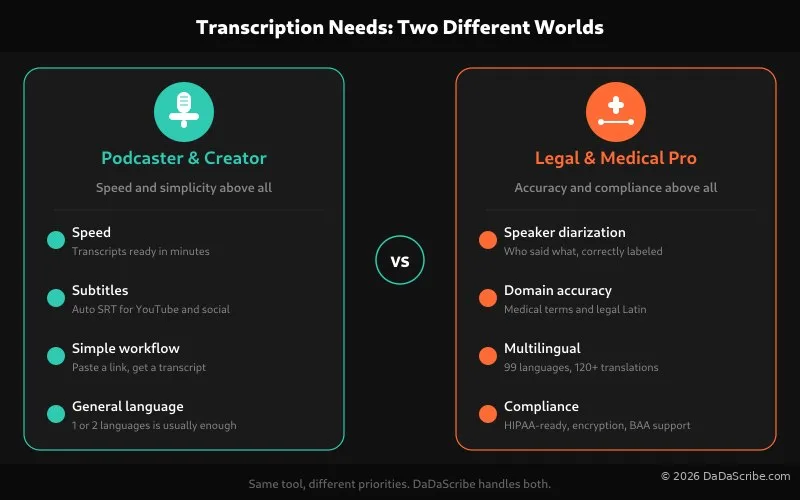
In legal and medical work, a large share of the audio that reaches a transcription tool is dictated, not captured from a live conversation. Attorneys dictate case notes, correspondence, deposition summaries, client intake summaries and billable-time narratives, often from a phone or handheld recorder between appointments. Clinicians dictate chart notes, SOAP notes, radiology and pathology reports, consult summaries and discharge documentation, frequently in a car between visits or at the end of a shift.
Dictation behaves differently from a courtroom feed or a clinic hallway recording. There is usually one speaker. The pacing is deliberate. The vocabulary is specialized and consistent within a specialty. And the audio is often cleaner than a meeting, because the speaker is close to the microphone and there is no cross-talk.
That changes what matters in a tool. With clean single-speaker audio, noise reduction is rarely the deciding factor. Terminology handling is, and so is turnaround: a dictated operative note or a deposition summary is usually needed the same day, and a filing deadline does not move. When you compare the tools below on dictation work, weight terminology accuracy and rush turnaround above raw noise handling.
The 5 Tools, Ranked by What Matters
DaDaScribe
Best for: Legal and medical teams that need diarization, multilingual support, and proofreading in a single subscription without per-feature upcharges.
DaDaScribe doesn't just feed raw audio into a speech-to-text engine. Every file runs through a four-stage pre-processing pipeline: noise reduction, level normalization, voice isolation, and proprietary optimization. This is the step most tools skip, and it's the one that makes the biggest difference on real-world recordings.
Ask any court reporter what kills transcription accuracy and they'll tell you: background noise, inconsistent mic levels, and overlapping voices. DaDaScribe's pipeline addresses all three before the transcription model ever touches the audio.
Speaker diarization is built in and automatic. No training speaker profiles. No configuring voice prints. Upload a file and the output labels Speaker 1, Speaker 2, Speaker 3, with consistent attribution across the full recording.
Language coverage is 99 source languages with translation to 120+ destinations. That is nearly double Sonix's 53 and in a different category from Otter's English-only approach.
Built-in proofreading runs after transcription to catch common errors and clean formatting. It is included in the subscription, not a paid add-on like Rev's human review tier.
Pricing: $4.99/month for 3 hours (Basic), $9.99/month for 8 hours (Standard), $29.99/month for 30 hours (Pro). At the Pro tier, that works out to about $0.016 per minute of transcription, with translation included. See full pricing details.
The pre-processing pipeline is what sets DaDaScribe apart. No other tool in this comparison cleans, normalizes, and isolates voices before transcribing. That directly improves accuracy on the kind of imperfect audio that legal and medical professionals deal with every day.
Rev
Best for: Court-admissible transcripts where certified human verification is legally required.
Rev is the default choice for law enforcement and court workflows, and for good reason. Their human transcription service produces verbatim transcripts with 99%+ accuracy guarantees, and courts accept them. For the official record, Rev is the standard.
But that standard comes at a price. Rev charges $1.50 per minute for AI + human-reviewed transcription. A single two-hour deposition costs $180. Run 10 depositions a month and you're at $1,800. Run 30 hours worth of discovery audio and you're at $2,700.
Rev does offer a pure AI tier at a lower rate, but it lacks the features that make DaDaScribe competitive: no speaker diarization in the AI tier (it routes through human transcriptionists instead), no built-in translation to other languages, and no audio pre-processing. If you upload noisy courtroom audio to Rev's AI tier raw, expect accuracy to drop.
Rev is the right tool when the transcript itself needs to be admissible. For the 80%+ of transcription work that's internal (discovery review, deposition prep, dictated client intake notes, dictated clinical documentation drafts), you're paying a 100× premium for a certification you don't need.
Sonix
Best for: Organizations that want SOC 2 Type II certification with decent multilingual support.
Sonix markets itself as the security-conscious option with SOC 2 Type II certification and HIPAA-ready workflows. If your compliance team requires specific certifications on paper, Sonix checks those boxes.
Sonix supports 53+ source languages and 42+ translation destinations. Speaker diarization is included, though it works best with clearly separated audio and struggles when speakers overlap or interrupt.
Accuracy claims sit at 99%, but Sonix doesn't publish the methodology or testing conditions behind that number. Without a pre-processing pipeline, that 99% figure assumes ideal recording conditions, something legal and medical professionals rarely have.
Pricing starts at $10 per seat per month for individuals, but enterprise pricing with HIPAA Business Associate Agreements and admin controls is hidden behind a sales contact form. If you're evaluating tools on a deadline, the opacity is a friction point.
Sonix is a solid middle ground for organizations that need SOC 2 on paper and can live with half the language coverage of DaDaScribe at a higher per-seat cost.
Otter.ai
Best for: Internal team meetings and call notes, not legal or medical transcription.
Otter is a meeting assistant, not a transcription platform. Its diarization relies on known speaker profiles: Otter learns your team's voices over time and labels them by name in recurring meetings. This works well for weekly standups. It breaks entirely on one-off depositions and consultations where speakers are new every session.
Language support is effectively English-only, with limited Spanish and French in beta. For a law firm handling international clients or a hospital serving multilingual patients, this is a non-starter.
Otter's free tier (300 minutes/month) is generous, and the meeting-summary feature is genuinely useful for internal calls. But for the diarization, multilingual, and accuracy requirements of professional legal and medical transcription, Otter is the wrong tool for the job.
Good meeting notes app. Not a professional transcription tool. The speaker-profile approach to diarization makes it unusable for depositions and consultations with unknown speakers.
TurboScribe
Best for: Budget-conscious solo practitioners working in English with single-speaker audio.
TurboScribe's headline feature is unlimited transcription for $10/month. The speed is impressive (roughly 5 minutes to transcribe an hour of audio) and language support is broad at 98+ source languages with 134 translation destinations.
The dealbreaker: no speaker diarization. Every speaker gets merged into a single text stream with no attribution. For a deposition, a medical consult, or any compliance interview with more than one person in the room, the output is effectively useless without hours of manual cleanup.
The "unlimited" pricing model also raises practical questions. At $10/month for unrestricted usage, where are the trade-offs? Accuracy, privacy infrastructure, and support responsiveness are areas where unlimited-tier products typically cut corners, and for legal and medical professionals handling sensitive audio, those corners matter.
TurboScribe's unlimited pricing is tempting for high-volume solo work, but the complete absence of diarization eliminates it for any multi-speaker professional use case.
Real Transcripts, Real Numbers: DaDaScribe Demos
DaDaScribe publishes actual demo transcripts on its demos page. None of the other tools in this comparison let you inspect output without signing up first. Here are three demos, with processing times and output details, that are directly relevant to legal and medical professionals.
AI Law to Be Voted on in Europe (BBC News)
A 2-minute 11-second news segment covering the EU AI Act, dense with legal terminology, regulatory acronyms, and proper names of European institutions. DaDaScribe processed it in just 55 seconds from English into Chinese (Simplified), French, Italian, and Spanish simultaneously.
Walter Isaacson on Lex Fridman Podcast
A 2-hour 7-minute interview covering topics from biography to technology policy. Two speakers with frequent back-and-forth. DaDaScribe processed it in 15 minutes 34 seconds (about 4.8× real-time speed) with consistent speaker labels across the full recording. English source with translations to Chinese, French, Portuguese, and Spanish.
Greg Lukianoff on Lex Fridman Podcast
The longest demo at 2 hours 31 minutes, comparable to a full morning of depositions. Two speakers discussing free speech, cancel culture, and legal precedent with frequent topic shifts and occasional overlapping dialogue. DaDaScribe processed it in 19 minutes 39 seconds with speaker separation maintained throughout. Translated to French, Italian, Portuguese, and Spanish.
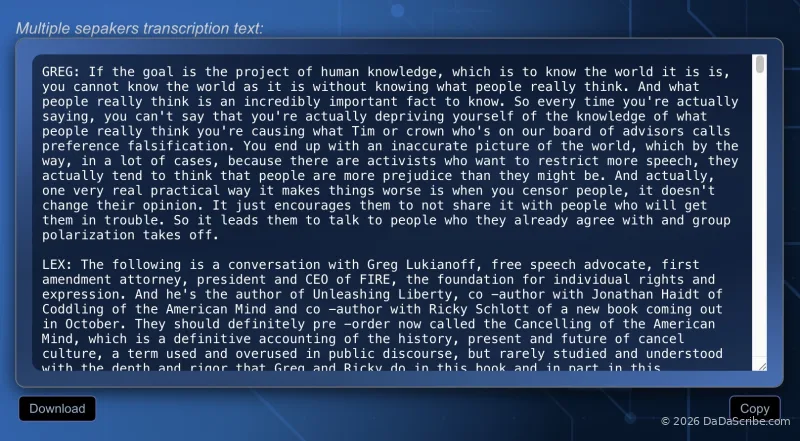
Across all three demos, processing speed averages roughly 4× real-time. A 2.5-hour recording finishes in under 25 minutes. Translations to four or five languages are generated in the same job, not queued as separate tasks.
At a Glance: Feature Comparison
| Feature | DaDaScribe | Rev | Sonix | Otter.ai | TurboScribe |
|---|---|---|---|---|---|
| Speaker Diarization | Built-in, automatic | Human transcriptionists only | Available | Known speaker profiles only | None |
| Source Languages | 99 | ~15 (AI tier) | 53+ | English only (ES/FR beta) | 98+ |
| Translation Destinations | 120+ | None | 42+ | None | 134 |
| Built-in Proofreading | Yes, included | Paid add-on (human review) | No | No | No |
| Audio Pre-Processing | 4-stage pipeline | No | No | No | No |
| Processing Speed (1 hr audio) | ~10 min | Hours (human reviewed) | ~10-15 min | ~10-15 min | ~5 min |
| Starting Price | $4.99/mo (3 hrs) | $1.50/min | $10/seat/mo | $16.99/seat/mo | $10/mo (10 hrs) |
| Best Value Tier | $29.99/mo (30 hrs) | N/A | Contact sales | Contact sales | $10/mo (unlimited) |
Frequently Asked Questions
Can AI transcription be used for official court records?
No. US courts require AAERT-certified court reporters or equivalent for filed transcripts. AI transcription is a draft, discovery, and preparation tool (useful for deposition prep, evidence review, client intake, and dictated case notes), but it cannot replace the certified official record. Every honest vendor in this space will tell you the same thing. For a deeper dive on where AI fits versus human transcription, see our AI vs Human Transcription guide.
Is DaDaScribe HIPAA compliant?
DaDaScribe handles audio and transcripts with industry-standard encryption and data protection practices. For covered entities that need a signed Business Associate Agreement (BAA), contact our team. We work directly with legal and medical practices to ensure their compliance requirements are met. Unlike tools that dodge the question or bury it in a terms-of-service page, we're transparent about what our infrastructure supports.
Which tool handles medical terminology best?
Terminology accuracy depends as much on audio quality as on the transcription engine. A perfectly trained medical vocabulary model will still fail on a recording with background noise, uneven mic levels, or overlapping voices. DaDaScribe's pre-processing pipeline (which cleans, normalizes, and isolates voices before transcription) addresses this at the source. According to our own published accuracy data, that preprocessing adds roughly 20-25% to the accuracy figure, which is why the 95.5% average we report on regular speech is not raw AI output; it's the result of cleaning the audio before it reaches the model. More detail in our AI vs Human Transcription guide.
Can I record in another language and get an English translation?
Yes, and this is where DaDaScribe pulls ahead of most competitors. Upload audio in any of 99 source languages and request translation to any of 120+ destination languages, all in a single job. A Spanish-language medical consultation can be transcribed in Spanish and simultaneously translated to English for a referring physician. Sonix offers a similar workflow for 53 languages; Otter doesn't offer it at all.
How does DaDaScribe compare to Rev on price?
Rev charges $1.50 per minute for AI + human-reviewed transcription. A two-hour deposition costs $180. DaDaScribe's Pro plan is $29.99 per month for 30 hours. That same two-hour deposition costs roughly $2.00 in plan allocation. Run 30 hours of depositions in a month and you pay $29.99 on DaDaScribe versus $2,700 at Rev's per-minute rate. The trade-off is Rev's human review layer, which matters for court-admissible transcripts but is unnecessary for discovery, prep, and internal documentation. More details on our pricing page.
What if my recording has terrible audio quality?
Poor audio is the norm in legal and medical settings, not the exception. Courtroom recordings pick up ambient noise. Clinic dictation happens in rooms with HVAC hum and hallway conversations. Compliance interviews are conducted in field conditions. Most transcription tools feed audio directly to the engine and hope for the best. DaDaScribe runs every file through noise reduction, normalization, and voice isolation first. The same pre-processing that brings noisy recordings closer to studio quality before a single word gets transcribed. This is why our demo transcripts hold up on real-world audio, not just clean test samples.
The Bottom Line
If you need court-admissible transcripts with certified human verification, Rev is still the standard and you should use it for those cases.
But that describes a small fraction of the transcription work legal and medical professionals actually do. The other 80%+ (deposition prep, client intake, clinical notes, compliance audits, multi-language casework, internal investigations) doesn't need a human stamp. It needs accurate speaker attribution, support for the languages your clients and patients actually speak, and output you can trust without proofreading for hours.
DaDaScribe delivers that at $4.99 to $29.99 per month with features no other tool in this comparison combines: automatic speaker diarization, 99 source languages, translation to 120+ destinations, built-in proofreading, and a pre-processing pipeline that improves accuracy on the kind of imperfect audio you actually record.
Try it with your own audio. The 10-minute free demo requires no credit card, no commitment, and no sales call afterward. Upload a file, see the output, and decide if it fits your workflow. You can also browse our full demo library to see real transcripts before signing up.
Comments & Questions
Please log in or sign up for a free account to leave a comment or question.
No comments yet. Be the first to ask a question!
Display more comments…